You record the show. We deliver the rest
Your own AI editor, set up for your show. Send the recording and get back the episode, subtitles, graphics, music and shorts, checked and ready to post.
Early-access spots are limited.
Watch the demo · 2 min
Where the prices in the film come from
Miloop Editor prices on the card are as of November 2026, for one 30-minute episode from one camera with up to 60 minutes of footage.
Editor rates on the card are freelance rates per video for a 10–20 minute YouTube video, from Pixflow, “How to Price Video Editing Services: A Freelancer’s Rate Guide” (November 16, 2026): intermediate $300 to $800, senior $800 to $2,500.
- Made for
- Interviews, talk shows, solo shows, green-screen talks and shorts
- Languages
- English, Chinese, or both on screen
- You receive
- The episode, shorts for each platform, subtitle files
- Works on
- Any modern browser, on a computer (Windows or Mac) or a phone. Nothing to install.
Why it’s different
An AI editor that knows your show and checks its own work
-
It learns your show
Say it once, and every episode after is made that way.
-
Shaped by real shows
Its editing comes from real episodes, made with their creators and published.
-
Checked before you see it
The volume is right for each platform, and you have time to read every subtitle.
Real episodes
Three shows, three ways in
A studio interview, a phone recording at home, and an episode another editor had already cut. All three are on the creator’s channel. Play the highlights, or watch the full episodes on YouTube.
-
Studio interview
- What came in
- Three cameras, 34:58 of footage
- What went out
- A 31:42 episode with 1,028 lines of subtitles, 72 cards drawn for the talk, and 57 licensed clips
1:29 of highlights from the 31:42 episodeWatch the full episode on YouTube
-
Solo show, recorded on a phone
- What came in
- One phone on a desk, 10:26, read from a script
- What went out
- An 8:18 episode in four chapters, with music throughout, sourced pictures and a cover pack. The first cut came back the same day.
1:24 of highlights from the 8:18 episodeWatch the full episode on YouTube
-
An episode your editor already cut
- What came in
- A 27-minute interview, cut and mixed by the creator’s own editor
- What went out
- The show layer on top: four chapters, 27 cards drawn for the talk, 760 lines of bilingual subtitles, licensed footage
1:16 of highlights from the 27:25 episodeWatch the full episode on YouTube
-
Green screen
Green screen
- What came in
- One person in front of a green screen
- What went out
- Cut out with clean edges, a background built for the topic, the face lit, and the finished composite delivered. The first one isn’t published yet; ask us for a sample.
Before and after
The same second, before and after
Left, the delivered episode. Right, the same frame before finishing. Drag the line to compare.
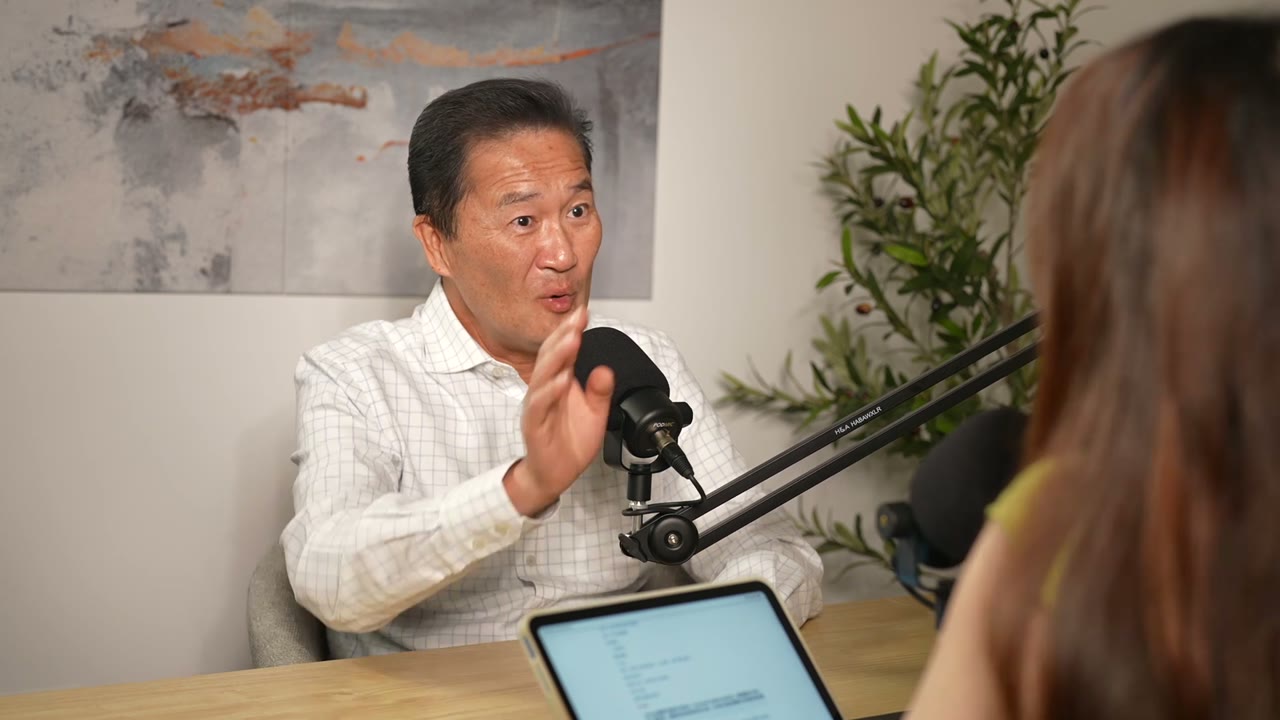
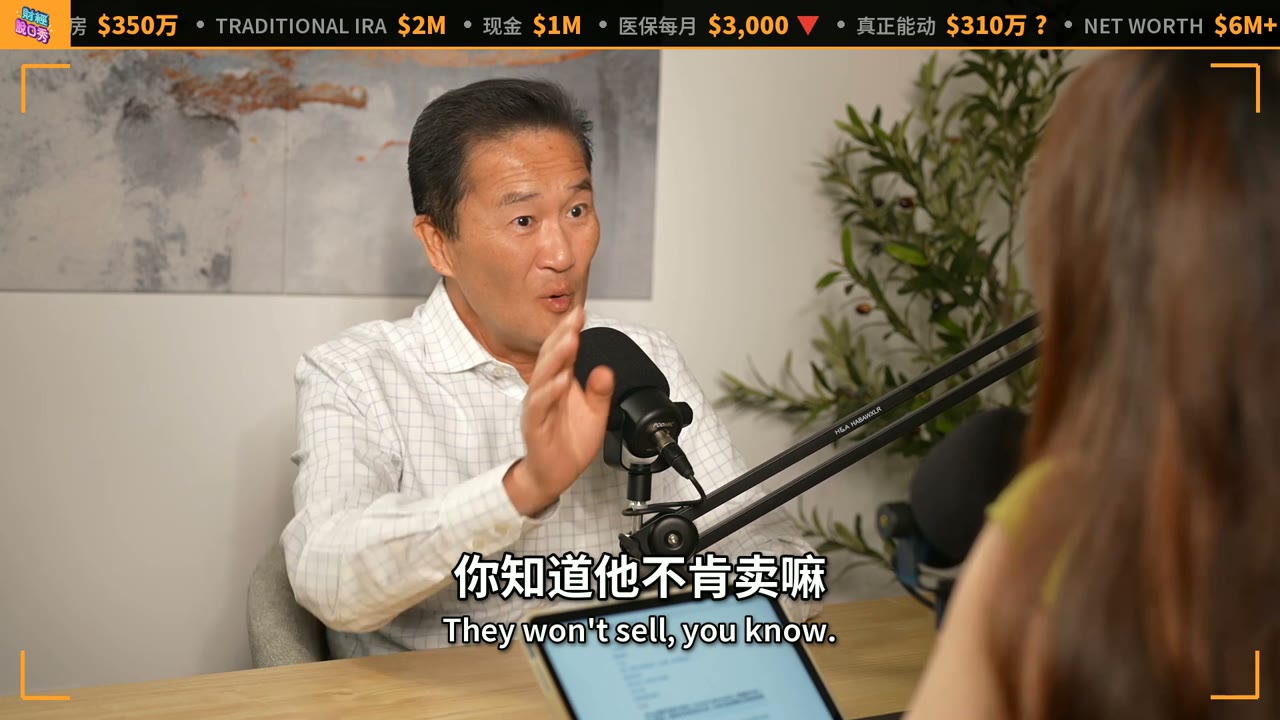 After
Before
The opening: the show’s frame, with the numbers that make people stay.
Shorts
Every short, ready for every platform
Each short comes in a version for every platform you post on, such as TikTok, YouTube Shorts, Instagram Reels and Facebook Reels.
Three editions
Rough cut, fine cut, or the full package
Each edition includes everything in the one before it. Start with the rough cut and pay the difference to upgrade. Shorts are always fully finished.
The same 33 seconds, in all three editions
The same 33 seconds of the solo episode above, cut three ways. Play them side by side to see what each edition adds.
-
Rough cut
-
Fine cut
-
Full package
Why Miloop Editor
Compared with a traditional editor
Sources: ¹ Pixflow, “How to Price Video Editing Services: A Freelancer’s Rate Guide” (November 2026): freelance rates per video for a 10–20 minute YouTube video, intermediate $300–800, senior $800–2,500. ² Rev, pricing: captions from $1.99 and translated subtitles $10.49 per minute of video.
After you upload
The part no tool does for you
Editing tools hand you a draft, and finishing it is still your evening. These are the jobs that end when the recording goes to Miloop Editor.
Software hands you a draft. Miloop Editor hands you the episode.
Before it reaches you
Every film passes these checks
What a careful editor would watch for once more before sending. Here it happens on every film, every time.
- Loudness and peaks at the platform’s standard, for the episode and for every short
- Sound and picture in sync to the last frame
- Subtitles cover every spoken word
- No card, name strip or subtitle sits over a face
- No stray frame flashes at a cut
- Music stays under the voice all the way through and never drops out
- Every clip and photo is still available at its source, and its licence is on your list
- Shorts keep clear of each platform’s buttons and captions
And more. The list grows with every episode we deliver.
Ask for a change, and only that changes. Everything else stays frame for frame.
How it works
Set up once, then every episode takes a few clicks
Miloop Editor isn’t software you buy and then learn. We set it up for your show first, and every episode after follows it.
-
01
We set it up for your show
Once, at the start: your look, your pace, your platforms and languages. Ask for something once and every episode after follows it.
-
02
Upload your recording
In your browser, from your computer or phone.
-
03
Pick from its proposals
Your AI editor lays out the choices; you decide what stays.
-
04
Download the films
The episode and the shorts, ready to post.
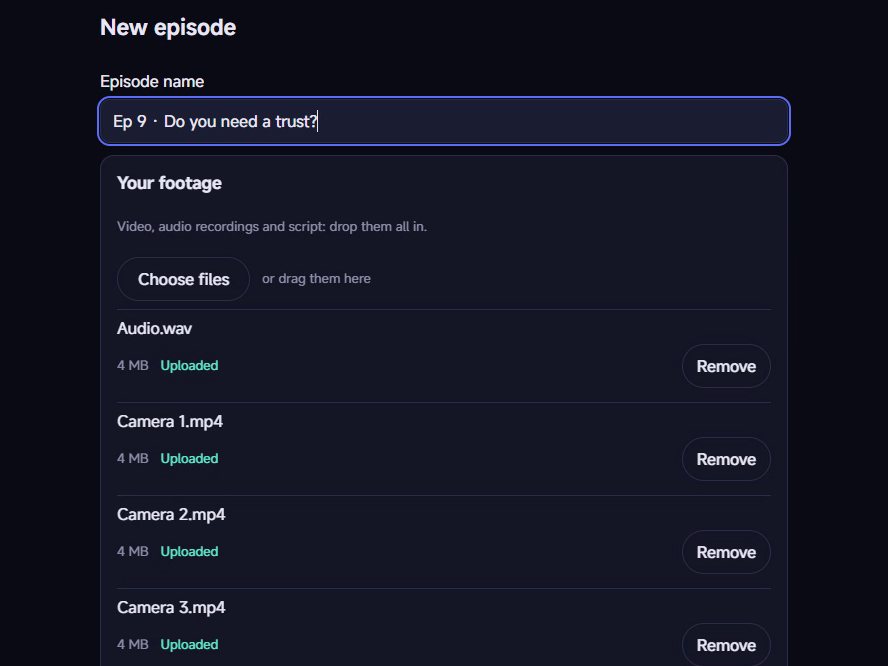
Drop in the video, audio and script 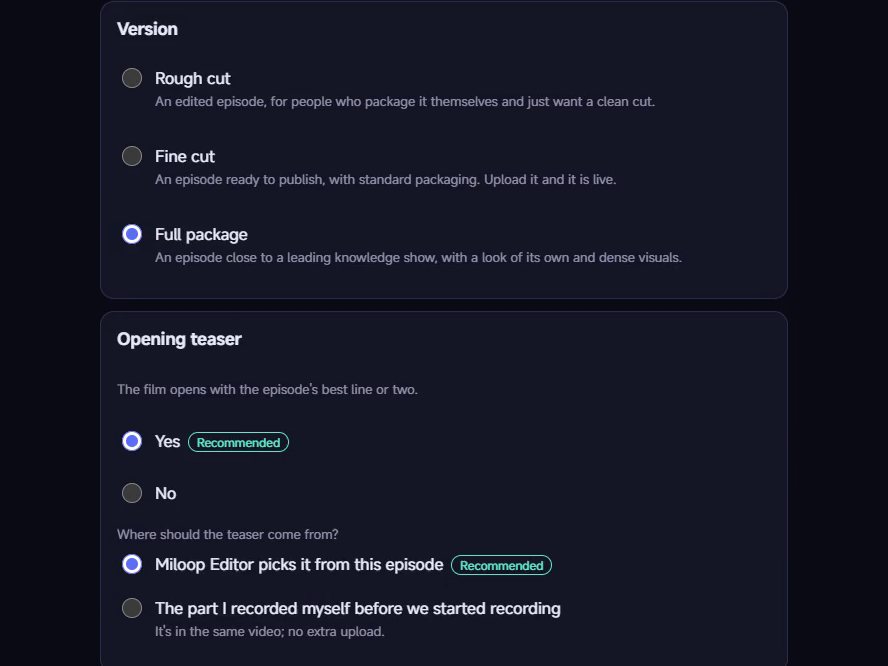
Answer a few questions at the start 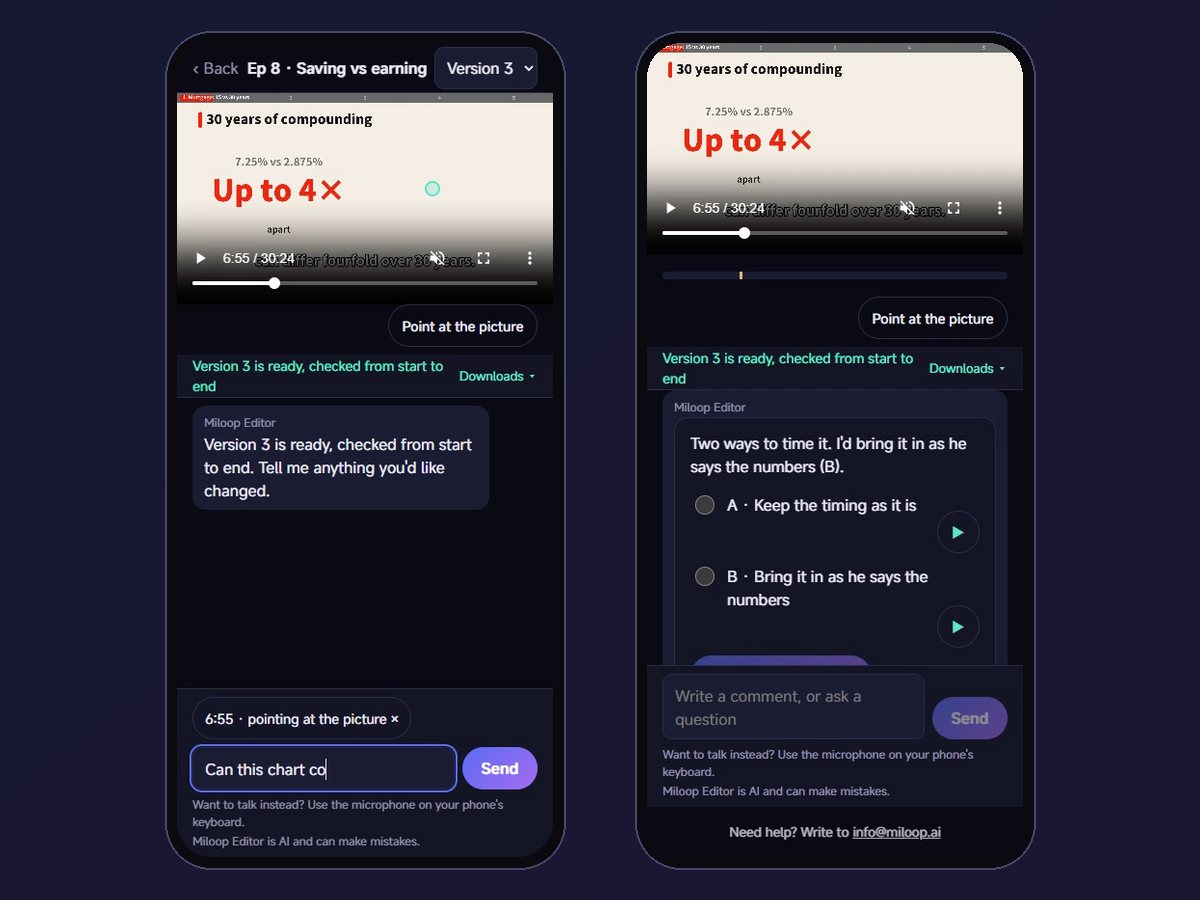
Point at what to change, right on the picture 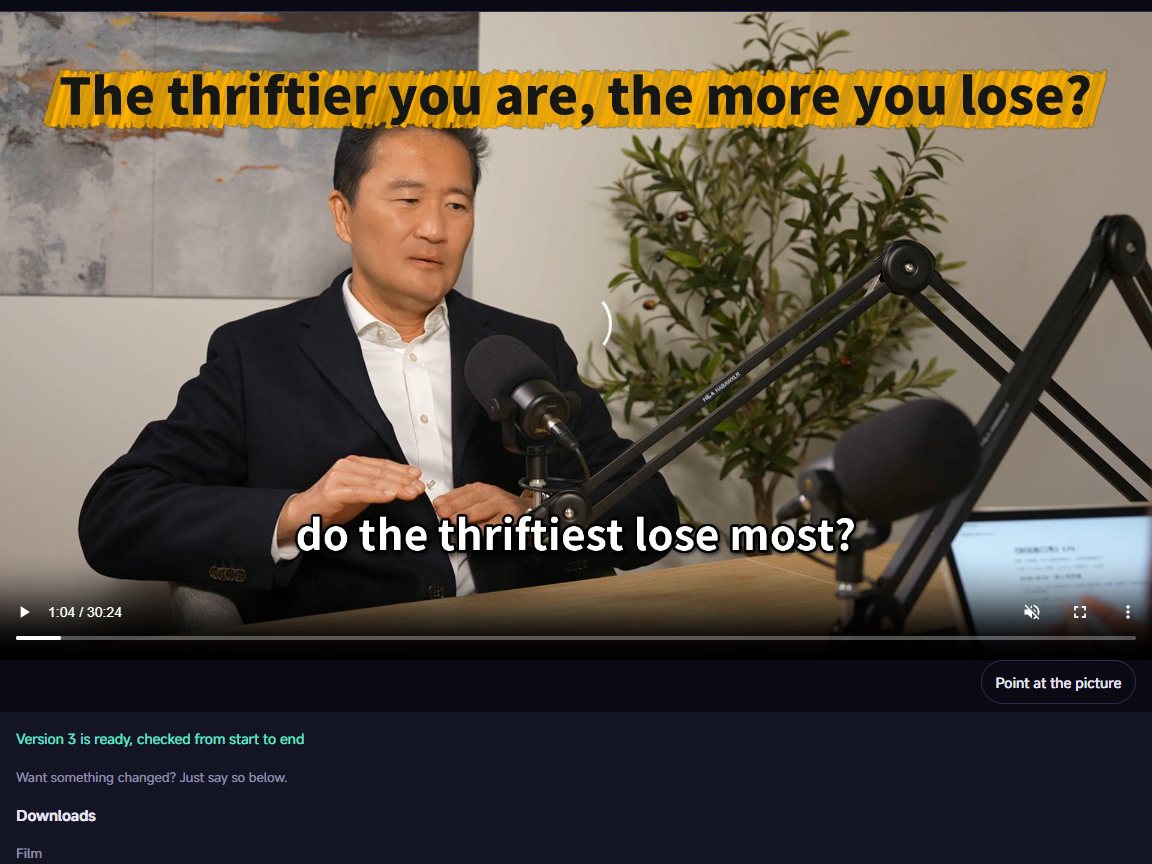
Download the episode and everything with it
Long-form comes as a rough cut, a fine cut, or the full package. Shorts are always fully finished. Set up once, then priced by the episode.
Questions
Before you reserve
Can I start now?
Not yet. New clients join the waitlist, and we’ll email you when we open.
What do I need to send?
Your recording, uploaded in your browser: video, audio and script together. Your logo and show style are set up once, when your account opens.
Who owns the finished films?
Which languages do you work in?
How much does it cost?
Each episode is priced by its edition and the length you ask for, and you see the price before you press Start. The film above shows two examples.
What happens after I join the waitlist?
You’re on the waitlist. We’ll email you when Miloop Editor opens to new clients.
Is it made with AI?
Yes. Miloop Editor runs on our own AI editing workflow, which is how a finished episode and its shorts can come back at this price. Every film is checked from start to end before it reaches you, and if a check fails, our team steps in.
Is it software I buy?
No. It’s your own AI editor, set up for your show. You use it in your browser, with nothing to install.
I already have an editor.
I record on my phone, with no studio.
Can you work with a green screen?
Who answers for the rights to pictures and music?
How many rounds of changes?
Two rounds are included, and fixing our own mistakes never counts as one. You send one list per round, only what’s on the list changes, and the rest stays frame for frame. The terms have the details.
Early access
Join the waitlist
Miloop Editor is in early access. Join the waitlist and we’ll email you when we open to new clients.
Sample films: 财经脱口秀 (Finance Talk Show) and 硅谷C位, produced by Shen Studio (大道传媒), shown with permission.